Master Your 2023: The Ultimate 365-Day Digital Planner
As we step into a new year, the difference between a chaotic schedule and a streamlined, productive life often comes down to your organizational system. For the modern professional, entrepreneur, or creative spirit, paper planners can feel restrictive. We live in a digital world, and our planning tools need to match that agility. Enter the Yearly Planner 2023 with Calendar 365 Day, a comprehensive digital solution designed to keep every aspect of your life—appointments, goals, and finances—in perfect harmony. This isn't just a calendar; it is a complete ecosystem for your iPad, tablet, or desktop, featuring a robust 389-page interactive PDF structure that ensures you never miss a beat.
A Seamless Digital Architecture: 389 Pages of Control
The core strength of this Yearly Planner 2023 lies in its meticulous architecture. We understand that modern planning requires more than just a grid of dates. You need a system that connects the macro view (your year) to the micro details (your daily tasks). This planner achieves that through a network of hyperlinks that make navigation instant and intuitive.
The package includes three distinct but interconnected sections:
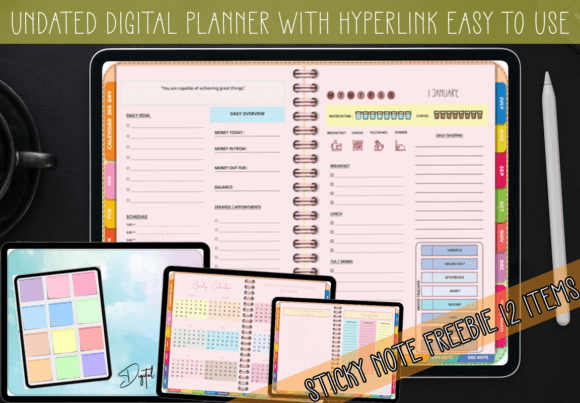
- Daily Planner (365 Pages): Every single day of 2023 gets its own dedicated page. This space is designed for high-volume scheduling, allowing you to break down your day hour-by-hour or use open space for bullet journaling. The interface is clean, minimizing visual clutter so you can focus on the task at hand.
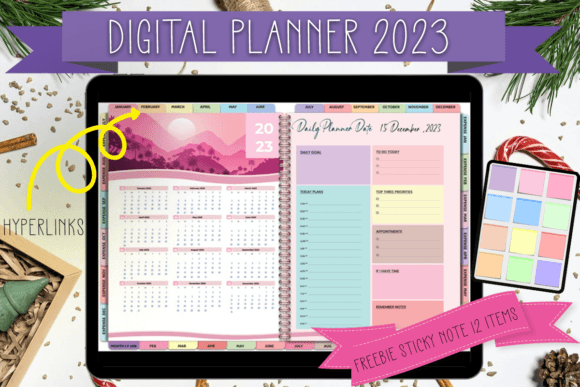
- Monthly Planner (12 Pages): Here is where strategy meets execution. The monthly view allows you to see the "big picture" for the coming weeks. It is perfect for marking major deadlines, content calendars, and social events. Crucially, the days on the monthly view are hyperlinked directly to the corresponding daily page, making navigation seamless.
- Expense Tracker (12 Pages): Financial organization is often the missing piece in creative planners. By dedicating a specific page for each month's expenses, this planner helps freelancers and small business owners track cash flow without needing a separate app.
The magic lies in the connectivity. When you open the Yearly Planner 2023, you can jump from the yearly overview to a specific month, and then to a specific day, with a single tap. This "digital backbone" saves you the frustration of scrolling through hundreds of pages to find a specific Tuesday in October.
Visual Appeal and Functional Design
A planner must be a tool you want to open every morning. The design philosophy here focuses on clarity and versatility. The layout avoids heavy graphics or distracting borders, opting instead for a minimalist aesthetic that functions as a blank canvas. Whether you are a graphic designer sketching out a mood board or a project manager listing deliverables, the clean typography and spacing allow your content to breathe.
Moreover, the inclusion of the Freebie Sticky Notes Pastel Style (12 items) adds a layer of tactile charm to the digital experience. These PNG assets mimic the look of soft, pastel-colored sticky notes. You can use them to highlight urgent tasks, tag important meetings, or simply add a pop of color to your layout. Because they are provided as high-quality PNGs, they integrate perfectly into apps like GoodNotes, Notability, Noteshelf, or Xodo. They allow you to "layer" information on top of your planner pages, replicating the satisfaction of moving a physical sticky note across a desk.
Optimizing Your Workflow: Tips for Digital Planning
Simply owning the Yearly Planner 2023 is the first step; using it effectively is the goal. To get the most out of this 389-page system, consider how you interact with your digital device.
- Utilize the Layers: In apps like GoodNotes, you can write on a separate layer from the planner's base text. This ensures your handwriting doesn't permanently cover the dates or lines, allowing you to erase and re-plan without damaging the original file.
- Color Coding Strategy: Use the pastel sticky notes to categorize your life. For example, use the yellow note for personal errands, the pink for client work, and the blue for health goals. This creates an instant visual hierarchy on your monthly overview.
- Leverage the Expense Tracker: Don't let the financial pages go to waste. Treat the expense tracker as a weekly check-in. By reviewing your 12 monthly expense pages regularly, you can spot trends in your spending habits—crucial data for anyone running a small business or freelancing.
- Hyperlink Navigation: Get comfortable with the hyperlink buttons. Instead of scrolling, tap the "Month" button to jump back to the calendar view. This mimics the efficiency of a website, making your planner feel like a high-functioning software tool rather than a static book.
Compatibility and Versatility
One of the biggest hurdles in digital planning is file compatibility. This planner is delivered as an Interactive PDF, which is the universal standard for digital notebooks. This means you are not locked into a single ecosystem. Whether you are an Apple user with an iPad and Apple Pencil, or an Android user with a Samsung tablet and stylus, the file works seamlessly.
The Yearly Planner 2023 is particularly useful for those who wear multiple hats. A blogger can use the daily pages to schedule content production, the monthly pages to track editorial themes, and the expense pages to monitor ad spend. A content creator can plan video shoots on the daily view and track sponsorship payments on the financial pages. It is a versatile tool that adapts to your specific workflow rather than forcing you into a rigid structure.
Why 2023 is the Year to Go Digital
Physical planners have their charm, but they lack the adaptability required for the fast-paced nature of modern business and creativity. You cannot "undo" a pen stroke, and you certainly cannot hyperlink a paper calendar to a specific meeting note. The Yearly Planner 2023 bridges the gap between the analog joy of writing and the digital necessity of organization.
By consolidating your schedule, your notes, and your finances into one 389-page file, you reduce the cognitive load of switching between apps. Everything you need is in one place, accessible with a tap. The pastel sticky notes add a human touch, ensuring that your digital workspace feels warm and personalized.
As you navigate the complexities of 2023, equip yourself with a tool that is built for the task. The Yearly Planner 2023 with Calendar 365 Day offers the structure of a professional planner with the flexibility of a digital app. Download the file, load it into your favorite PDF annotation app, and start organizing your year with intention and style.